S.S.E. File Encryptor for PC15.0.6
Publisher Description
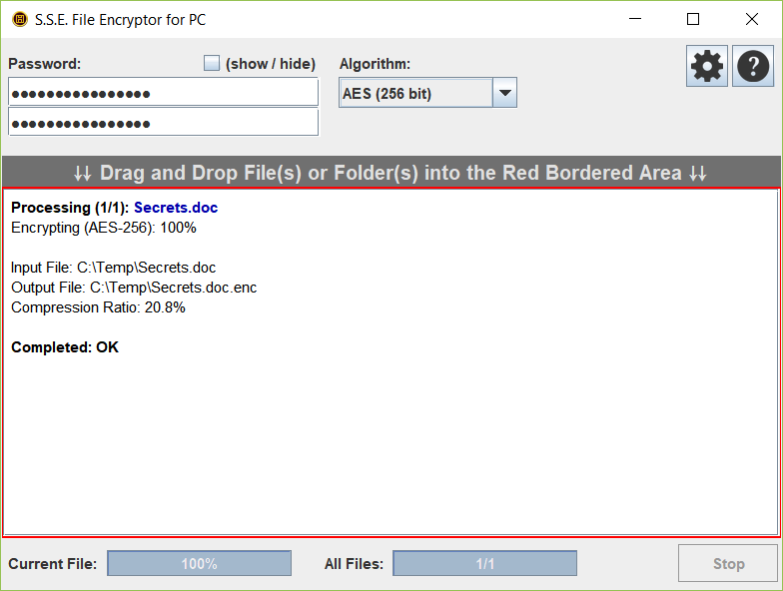
Securely encrypt your private and confidential files or whole folders. The encryption/decryption process is simply done by dragging the selected file(s) or folders(s) to the application window.
Files are encrypted using strong encryption algorithms: AES (Rijndael) 256bit, RC6 256bit, Serpent 256bit, Blowfish 448bit, Twofish 256bit, GOST 256bit + (Threefish 1024bit and SHACAL-2 512bit for Pro Version) ciphers are available.
Cross-Platform (Windows, Linux, Mac OS X, ...) GUI Version and Command Line Version are available on: https://www.paranoiaworks.mobi/download
Compatible with Secret Space Encryptor for Android: https://paranoiaworks.mobi/sse
About S.S.E. File Encryptor for PC
This Encryption Tools program is available in English, Chinese, ChineseSimplified, Dutch, French, German, Greek, Hindi, Italian, Japanese, Korean, Portuguese, Russian, Spanish, Thai, Vietnamese. It was last updated on 29 September, 2026. S.S.E. File Encryptor for PC is compatible with the following operating systems: Windows, Windows-mobile.
The company that develops S.S.E. File Encryptor for PC is Paranoia Works. The latest version released by its developer is 15.0.6.
The download we have available for S.S.E. File Encryptor for PC has a file size of 1.0 MB. Just click the green Download button above to start the downloading process. The program is listed on our website since 2023-07-14 and was downloaded 111 times. We have already checked if the download link is safe, however for your own protection we recommend that you scan the downloaded software with your antivirus. Your antivirus may detect the S.S.E. File Encryptor for PC as malware if the download link is broken.
How to install S.S.E. File Encryptor for PC on your Windows device:
- Click on the Download button on our website. This will start the download from the website of the developer.
- Once the S.S.E. File Encryptor for PC is downloaded click on it to start the setup process (assuming you are on a desktop computer).
- When the installation is finished you should be able to see and run the program.
Program Details
General
System requirements
Download information
Pricing
Version History
version 15.0.6
posted on 2023-07-14
- Help update;
version 15.0.5
posted on 2022-07-25
- Performance optimization;
version 15.0.4
posted on 2021-10-26
- New option in application settings - Compress: Auto;
version 14.6.5
posted on 2021-06-16
- FIX: English language could not be enforced on some systems;
version 14.6.4
posted on 2021-03-01
- A new option in the application settings: "User interface (GUI) language";
version 14.6.1
posted on 2020-10-29
- Change of the naming of versions to be more standard + some optimizations;
version 14R3F
posted on 2019-08-16
- Minor GUI improvements;
version 14R4C
posted on 2019-08-16
- A file association for unencrypted files and multiple files;
version 14R3E
posted on 2019-07-10
- Minor GUI improvements;
- Better locating of executable files for function 'Custom command execution';
version 14R2C
posted on 2018-09-28
- A better interruption handling (when the application is forcibly closed during an encryption/decryption process).
